

Download Photos Duplicate Cleaner – free Mac duplicate photo remover tool
Overview
Photos Duplicate Cleaner is a lightweight, free utility built exclusively for macOS users who need a reliable way to locate and eliminate duplicate images in their photo libraries. First added to our curated selection in 2016, the app has quietly helped thousands of photographers, designers, and everyday Mac owners keep their collections tidy without sacrificing precious storage space. The current version, 1.7, was refreshed on 1 April 2017 and continues to support macOS X and later releases, delivering a smooth, native experience that feels right at home on any Mac.
Available in English, German, and French, the interface is intuitive: you simply point the scanner at a folder, let the engine do its work, and review a clear list of matches before deciding which copies to delete. Because the program is completely free, there are no hidden fees, subscription traps, or intrusive ads—just a straightforward tool that respects your privacy and your photo archive. Whether you’re a professional photographer juggling thousands of RAW files, a graphic designer cleaning up asset folders, or a casual user who wants to free up space on a MacBook Air, Photos Duplicate Cleaner offers a secure, no‑nonsense solution that integrates seamlessly with the macOS design aesthetic.
Key Features
- Fast, multi‑threaded scanning engine that detects exact duplicates and near‑identical images based on visual similarity.
- Support for all common image formats – JPEG, PNG, GIF, TIFF, BMP, HEIC, and RAW files from major camera manufacturers.
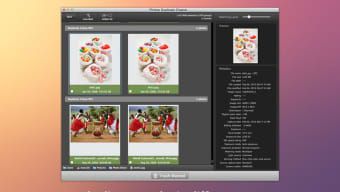
- Smart preview window that shows side‑by‑side comparisons, allowing you to keep the highest‑quality version.
- Customizable scan parameters: you can limit searches by file size, date range, or specific folders.
- Batch deletion with undo support – remove dozens of copies in seconds and restore them if you make a mistake.
- Low‑memory footprint – the app runs smoothly on older MacBooks without slowing down other tasks.
- Multi‑language interface (English, German, French) for broader accessibility.
- Free of charge with no hidden in‑app purchases, making it ideal for budget‑conscious users.
Each of these features is designed with the macOS workflow in mind. The scanning algorithm leverages native Apple frameworks to read image metadata quickly, while the visual similarity detection uses a lightweight hash comparison that balances speed and accuracy. For professionals who need to preserve EXIF data, the tool never strips metadata during the cleaning process.
Moreover, the batch deletion routine writes changes to a temporary log, giving you a safety net to revert accidental deletions. The intuitive UI follows Apple’s Human Interface Guidelines, meaning the buttons, sliders, and checkboxes feel familiar to any Mac user. Whether you’re cleaning a massive library in the Photos app or tidying up a shared network drive, Photos Duplicate Cleaner streamlines the entire process from start to finish.
Installation, Usage & Compatibility
Installing Photos Duplicate Cleaner is as simple as dragging the app into your Applications folder. Download the installer from the official website, double‑click the .dmg file, and drag the icon to the shortcut. Because the program is signed by a recognized Apple developer, macOS Gatekeeper will allow the installation without any security warnings. Once installed, launch the app from Launchpad or Spotlight; the first run may prompt you to grant access to your Pictures folder – this is required for the scanner to read image files. The permission request complies with macOS privacy standards and can be adjusted later in System Preferences → Security & Privacy → Privacy.
Using the tool involves three straightforward steps. First, click the “Add Folder” button and select the directory you wish to scan – you can add multiple folders at once. Second, configure optional filters such as minimum file size or date range to narrow the search scope; this is especially helpful for large archives where you only want to target recent imports.
Third, press “Start Scan.” The engine will analyze the selected locations, and within minutes (depending on the size of the collection) a list of duplicate groups will appear. Each group displays a thumbnail, file name, resolution, and size, enabling you to make informed decisions. Tick the checkboxes for the copies you want to remove, then click “Delete Selected.” An undo dialog appears, giving you a brief window to restore any mistakenly deleted files.
macOS X and later (including macOS Ventura, Monterey, and Sonoma) are fully supported. The app runs on Intel‑based Macs as well as Apple Silicon (M1, M2) thanks to universal binary packaging. Because the software is native, there’s no need for additional runtimes or Java installations. Minimum system requirements are modest: 512 MB RAM, 100 MB of free disk space for the app itself, and any Mac that can run macOS X 10.9 or newer. The lack of a large install size makes it an ideal companion for lightweight laptops and older hardware.
Pros, Cons, FAQ & Final Verdict
Pros
- Completely free with no hidden costs.
- Fast scanning engine that handles large libraries efficiently.
- Supports a wide range of image formats, including RAW.
- Native macOS design and low memory usage.
- Undo feature adds a safety net for accidental deletions.
Cons
- No built‑in cloud integration – works only on local drives.
- Interface lacks advanced reporting/export options.
- Last official update was in 2017, so future macOS compatibility is not guaranteed.
Frequently Asked Questions
Is Photos Duplicate Cleaner safe for my original photos?
Yes. The app never modifies the original file; it only deletes the copies you explicitly select. The undo function also allows you to recover any mistakenly removed images within a short time frame.
Can the tool detect similar images that are not pixel‑perfect duplicates?
Photos Duplicate Cleaner uses a visual similarity algorithm that can spot near‑identical images, such as those resized or slightly edited, but it focuses primarily on exact duplicates for maximum speed.
Do I need an internet connection to use the program?
No. All scanning and deletion processes run locally on your Mac. An internet connection is only required for the initial download of the installer.
Is there a limit to the number of files the app can scan at once?
There is no hard limit; the only constraints are your Mac’s hardware resources. The multi‑threaded engine is designed to handle very large collections, though extremely massive libraries may take longer to process.
Will the software work on Apple Silicon Macs?
Yes. The application is compiled as a universal binary, meaning it runs natively on both Intel‑based and Apple Silicon (M1/M2) Macs without performance penalties.
Final Verdict
For Mac users looking for a no‑cost, easy‑to‑use solution to purge duplicate photos, Photos Duplicate Cleaner delivers exactly what it promises. Its fast scanning engine, broad format support, and native macOS feel make it a solid choice for both casual and professional environments. While the lack of recent updates and advanced reporting features may deter power users, the core functionality remains reliable and secure. If you’re tired of manually hunting down duplicate images or want to reclaim valuable disk space, give Photos Duplicate Cleaner a try – it’s free, safe, and ready to run on any Mac you own today.
Ready to clean up your photo library? Download Photos Duplicate Cleaner now and start freeing up space on your Mac in minutes.







